Showing posts with label New Technology. Show all posts

Monday, January 16, 2012

Google Tips: Improving Your Search Skills

By: Muhammad Iqbal Akhtar


All of us are accustomed to using Google on daily basis, either directly or indirectly.

If I ask you what's the number of cancer patients in Pakistan? Almost all of you readers will jump onto Google or any search engine and query for the answer. Google is good at understanding natural questions like what is this, what is that but Google is also able to understand certain other statements which can help you make your search less time consuming & relevant, here are a few.


Get the World Time:

You want to call someone who lives in let's say Canada but you don't know the time there. Here's the simplest solution, just Google time Canada. A screen shot of the result:


Currency Converter :

Want the currency exchange rates or the exchange value? Just Google Currency A in Currency B.


Local weather?

No problem.

If your city result doesn't come up directly, use this term weather channel 'City Name' and open the first link of weather.com their reports are quite elaborate and neat.


Get Definitions

Want the definition of potpourri but don't want to read the Wikipedia article or lengthy explanations? Use this keyword, 'define: Desired Word'


A little calculation?


Search From a Particular Website:So you want to search for MMS Rates on Warid’s website but the search at Waridtel.com didn't get you your desired results or you are on a website that has no search facility. Here's how Google can help, write your search term than the keyword site: followed by desired website.


  • More search features are here on Google’s website: http://www.google.com.pk/intl/en/help/features.html
  • And yes you can always check Google Labs for any other of their upcoming projects and to-be-added new features, link: http://www.googlelabs.com/
  • Check this Google Labs India project that helps you in finding Hindi Music: http://www.google.co.in/music

By: Muhammad Iqbal Akhtar


Friday, September 30, 2011

Windows 1.0 to 8

1985  Windows 1.0


The First Version of Microsoft Windows, Windows 1.0, with simple applications and the concept of multitasking on PC.

1987  Windows 2.0 


The Second Version of Windows, Windows 2.0 with some fixes and the Control Panel. 

1988  Windows 2.1 


The Second Version of Windows with some additions, and some fixes, Windows 2.1, the Paint software is seen in this one! 

1990  Windows 3.0 


The Third Version of Windows, Windows 3.0, featuring the File Manager and Program Manager, replacing the old MS DOS based File and Program Managers. 

1992  Windows 3.1 


The later released upgraded version of Windows 3.0, which had support for 32-bit Disk Access, Personalization options and had the Minesweeper game for the first time. 

1995  Windows 95 


Windows 95, the changed look, the new interface and the beginning of the form of Windows which we see now. Enhanced Graphics and better Communication Programs. 

1998  Windows 98 


Windows 98, one of the most successful versions of Windows till now, this version of Windows can still be seen in some PCs even today. With Extended Softwares, better Performance, this Version was the first milestone in the path of the development of Windows. 

2000  Windows ME 


Windows ME or Windows Millenium Edition, though not a very popular version of Windows, but still it had some better tools and performance than the previous ones in some cases. 

2001  Windows XP 


Windows XP, the Daddy of all versions of Windows, the most popular version of windows even today. Windows XP is still used today because of its unmatched performance, tools and interface. This has been the best version of Windows till the arrival of Windows 7. 

2006  Windows Vista 


Windows Vista, though it didn't go so well in the public, but still its a good version of Windows specially for the interface the Windows Aerobic Effect, making the Window Transparency work like magic.

2009  Windows 7 


Windows 7, the best version of Windows till date. With the new and advanced features such as the Superbar, this version of Windows created another milestone for Microsoft after Windows 98 and Windows XP. Windows 7 features an unbeatable user interface, and powerful tools that makes it the best among the rest. 

2012  Windows 8 


Windows 8, to be released in the late 2012. The interface of Windows 8 as seen at the D9 Conference. A better version of Windows as proposed by Microsoft, with the changed User Interface.

By: Muhammad Iqbal Akhtar.

Sunday, September 18, 2011

Download and Install Differently Designed Windows 8


Yes Windows 8 comes with a hybrid design and isn’t like the Windows OS we are usually familiar with. Latest version brings completely new visual interface, which is optimized for touchscreen devices but can be equally efficient with mouse and keyboard for desktop computers.


Here’s a preview of What Windows 8 will look like:
Start Screen:


Lock Screen:


Keyboard and Apps (Earlier we used to call them programs):


File Management:


Download Windows 8

Microsoft was quick enough to release the developer version for Windows 8 for general public.
You can select from one of following versions available at Microsoft’s website:
  • Windows Developer Preview with developer tools English, 64-bit
  • Windows Developer Preview English, 64-bit
  • Windows Developer Preview English, 32-bit
It appears that Windows Developer Preview English, 32-bit will be suitable for many, unless you need to get the developer tools too.
You can download any version of Windows 8 from this link.

How to Install Windows 8 on Virtual Machines:

  • You can install Windows 8 preview on a virtual machine instead of dedicating an entire PC for it.
  • You can use VirtualBox for hardware virtualization
  • Download Windows 8 from above given link.
  • Create a new VirtualBox virtual machine and select Windows 8 as the OS type.
  • In the Motherboard tab under System, check Enable IO APIC.
  • In the Processor tab under System, check Enable PAE/NX.
  • In the Acceleration tab under System, check Enable VT-x/AMD-V and Enable Nested Paging.
  • In the Video tab under Display, check Enable 2D acceleration.
  • Remember to mount the Windows 8 .ISO file you downloaded and you’re good to go!
Note: Make sure your PC supports hardware virtualization for this to work, or you can go with a fresh machine to install Windows 8. Remember, you can’t un-install this copy of Windows unless you format the drive.
Want to Change Metro UI:
  • If you want to disable the Metro UI?
  • Go to: HKEY_CURRENT_USER\Software\Microsoft\Windows\CurrentVersion\Explorer\
  • Change the value of RPEnabled from 1 to 0.


Saturday, July 9, 2011

Google Plus: Basic Tips for Beginners


Google+ is on its way to charm people and many of the Facebook users are already making their minds to take a shift, so it is just matter of time, but again these are somehow pre-mature thoughts, so we will have to wait and see the impact.
Frankly speaking, we had to spend sizable amount of time to get familiar with Google+, we thought of saving you from the effort. So let’s start with Google+ and here you will get some basic useful tips if you are just joining Google+ or are still wondering what to do here?

Getting Started

There has been much hype about how and from where to get Google+ invitations. People started writing tutorials on how to invite someone on Google+, but Google has resolved the issue now and you do not need to end up pasting your email address here and there to ask for an invite.
Registrations on Google+ are now open and you can sign up without any invite. Simply visithttp://google.com/+/ and register yourself.

Welcome to Google+

If you have ever used any of Google’s services (Gmail, Google Profile, Blogger, etc.), then there are chances that Google+will detect more than 50 percent of your bio – to fill your profile. Don’t worry, your privacy settings will not be disturbed. For instance, you can link your Picasa account with Google+ while maintaining the same privacy settings as they were with your Picasa account.
So it’s time now to upload your profile picture and write something about you.

Build Your Circles

Next thing that you should do is, build up your circles and invite others. But to know what really circles are, read below:
  • Circles are different set of groups, or lists with different permissions. You can add your contacts in these circles to make sure that you don’t share your information with those who shouldn’t see them.
  • You will get updates from contacts that you have added in your circle. Just like twitter, you start getting updates from those whom you follow
  • Contacts in your circle will not get your updates, though they will be invited – but they can deny any incoming requests.
By default Google offers following circles to you, of course you can create more with ease
  • Friends
  • Family
  • Acquaintances
  • Following
You can simply mouse over them to read what kind of circle it is and sharing settings.

Adding Contacts to Circles:

  • Click circle button (right on top middle – or where the red arrow is in above image)
  • Go to "Find and Invite" tab
  • Here you will be suggested with contacts that you may want to add in your circles, drag and drop them in below circles… simple as that
  • Note: Suggestions will be those contacts that you recently interacted with on Gmail
  • Want to add someone who is not in suggestions: There’s a button “Add a new Person”, click on it – type email address and you are done.
So you are almost done with basic settings and this is the time to go out and say Here I am!

Posts and Stream

You must be familiar with wall posts on Facebook, here Google calls it stream. And for me, the most loveable feature of Google+ is to get stream from specific circle.

  • Select stream from any of your circle and updates from only those will be shown from the circle
  • You can Share a post from your stream, comment on it +1 it (kind of liking a post)
You can post an update, using the box given on top of stream – exactly like facebook has;
  • Post any thing you feel like, you can add videos, pictures, links and so on
  • You can edit posts later on, delete them, mute them and so on
  • You can select circles or contacts that you want your post to be shared with.
  • You can disable resharing and/or commenting.


Hangouts

Hangouts is the coolest feature of Google Plus, it will let you start a video conversation with as many friends of yours as you like.
Simply click the “Hangout” button available on right sidebar or visit this link:plus.google.com/hangouts
You’ll be taken to a "green room" where you can select circles or individuals to add in your room (video chat).

Sparks = Interests and Likes

Visit the Sparks menu from left sidebar and you will find featured interests. Don’t worry, you are not bound to like them. Search your interests and while adding them, Google+ will give you content suggestions that you can share on your wall, stream in fact.
Once again Google+ allows you here to set which circles you want to share with and it works the same way as described for the post.

Turning Off Email Alerts

By default, Google+ will email you for every post, comment, +1 or anything that happens and is related to you.
This may irritate you – so simply visit Google+ settings from the Options menu which you can find at the extreme right of black bar – codenamed the “Sandbar”, you must have noticed it appearing from few days.
So just un-check the relevant boxes and you are done.

Missing Facebook?

If you are missing Facebook here on Google+ and all that blue interface still mesmerizes you, make your Google+ look like Facebook.
It is simple and easy. Visit http://userstyles.org/styles/50051/google-facebook and follow the two step tutorial.
First install Stylish extension by selecting your browser from the list and then install the script. Here you are with your Google+ converted into Facebook!

This was just a sneak peak of Google+ for beginners.
Google has planned to add more features like Games, Events etc. As project is considered to be one of the prime goals of Google to compete it’s rival Facebook so we can expect a lot from Google here.
Source: 
http://propakistani.pk/2011/07/01/google-plus-basic-tips-for-beginners/

Tuesday, May 24, 2011

10 Hot New Tech Gadgets


~~~~~~~~~~~


The Logitech Wireless Solar Keyboard K750 makes battery hassles a thing of the past, even indoors. The keyboard connects automatically via a 2.4GHz wireless unifying receiver, and the solar battery will stay charged for up to 3 months, even in total darkness.
Cost: $79.99
~~~~~~~~~~~~~~

Making the perfect external storage companion to the Apple® Macbook®, MacBook™ Pro or Macbook Air™, the new Hitachi G-DRIVE™ slim external hard drive gives users 320GB of storage and ubiquitous USB 2.0 connectivity in an amazingly slim form. Formatted for Macs with simple plug n’ play connectivity, the G-DRIVE slim is Time Machine® ready for added backup protection, and it’s USB-powered, so there is no need to carry around an extra power cord.
Cost: $99.99
~~~~~~~~~~~~

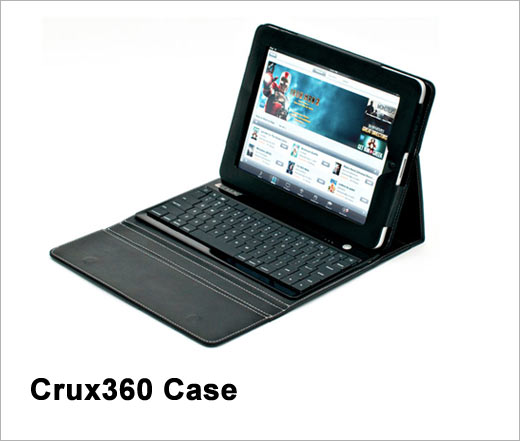
The Crux360 is a clamshell-keyboard case that allows you to use the iPad® in a multitude of positions. All iPad ports and buttons remain accessible while using the case.
It features a full bluetooth® keyboard, and features four modes:
  1. Laptop Mode — allows use of the keyboard.
  2. Movie Mode — great for watching videos, playing games, or just surfing the Internet.
  3. Tablet Mode — great for reading books or magazines.
  4. Carry Mode — closes up and protects your iPad’s® screen from nicks and scratches.
Cost: $149
~~~~~~~~~~~

The Livescribe Echo Smartpen allows you to record audio while you’re taking notes, and then play them back later. You can save and share interactive notes to your computer, iPad or iPhone via a micro-USB connector that also allows you to recharge your pen. The memory storage holds 400 or 800 hours of recorded audio, depending on the model, and includes an OLED display that makes it easy to navigate smartpen apps.
Cost: Starting at $169.95
~~~~~~~~~~~

The iLuv iMM747 Audio Cube is a fully-dedicated iPad stereo docking station. The Audio Cube provides two speaker channels, each with iLuv’s enhanced jAura Soundcell Technology. The iMM747 features easy docking via an adjustable, sliding docking wall, which provides secure iPad vertical support and a flexible 30 pin connector that automatically adjusts to dock your iPhone 4 or iPod as well.
Cost: $149.99
~~~~~~~~~~~~~

The LaCie Hub4 USB 3.0 gives you enormous flexibility to connect your peripherals, wherever you go. With four USB 3.0 ports, it's easy to get the fastest USB 3.0 speeds—up to 5Gb/s. It's even USB 2.0 compatible, so it works with almost all computers, laptops, and even netbooks.
Cost: $59.99
~~~~~~~~~~~~

The iFusion is an integrated communications docking station for the Apple iPhone. Combining the capabilities of many top-selling iPhone accessories into a single device, the iFusion utilizes built-in Bluetooth technology, a full duplex speaker phone and a patented ergonomic design to deliver superior voice quality that meets the requirements of today's home and business consumer.
The cradle design of the iFusion supports the iPhone 3G, 3GS and 4, providing a means to securely dock the phone while supplying power, battery charging and data synchronization via an integrated USB cable. With support for A2DP Bluetooth streaming, users are able to enjoy their favorite iPhone music over the internal speakerphone.
Cost: $169

~~~~~~~~~~~~~~~~

Maximize your brightness during presentations with the NEC P420X, an entry-grade professional installation projector loaded with eco-friendly and advanced technologies. Ideal for corporate boardrooms, higher education classrooms and government training rooms, this model delivers remarkable brightness (4200 lumens) and features built-in wall color correction, automatic keystone correction, wired and wireless networking, closed captioning and up to 3500 hours of lamp life (in ECO ModeTM). The P420X touts an active lens cover, which hides content, mutes audio and lowers lamp brightness to 25%, allowing you to maximize the effectiveness of your presentations.

Cost: $1,999.00

~~~~~~~~~~~~~~

myDitto Key enables SoHo business professionals to access their myDitto Servers remotely, through an easy-to-use, lightweight USB key. From owners who frequently travel on business trips to telecommuting employees, users simply insert their myDitto Key into a laptop or PC and — through a direct peer-to-peer connection — safely access any critical file from their office network server no matter where they are.
Cost: Starting at $145

~~~~~~~~~~~~~~~~

The WOWee ONE SLIM is a compact portable speaker unit which provides a full range frequency response. It is intended for use as both a fixed and portable solution for all iPod, iPad, mp3, mp4, mobile phone and computer applications. It uses the same hybrid technology as the WOWee ONE and produces an incredible bass sound with a 40Hz - 20kHz sound range.
The unit is powered by an internal rechargeable battery and can deliver up to 10 hours of playtime per charge. It can be recharged via computer USB or a 5V USB power adapter using a plug. There is also a built in LED low battery indicator.
Cost: Coming Soon